The most flexible visual clipboard manager for Mac.
Every copy—text, syntax-highlighted code, live hex colors, links, images, files, and AES-256 encrypted passwords—organized into a lightning-fast visual board, always one ⌘⌥V away.
brew install --cask ademkivanc/tap/easyclipboard
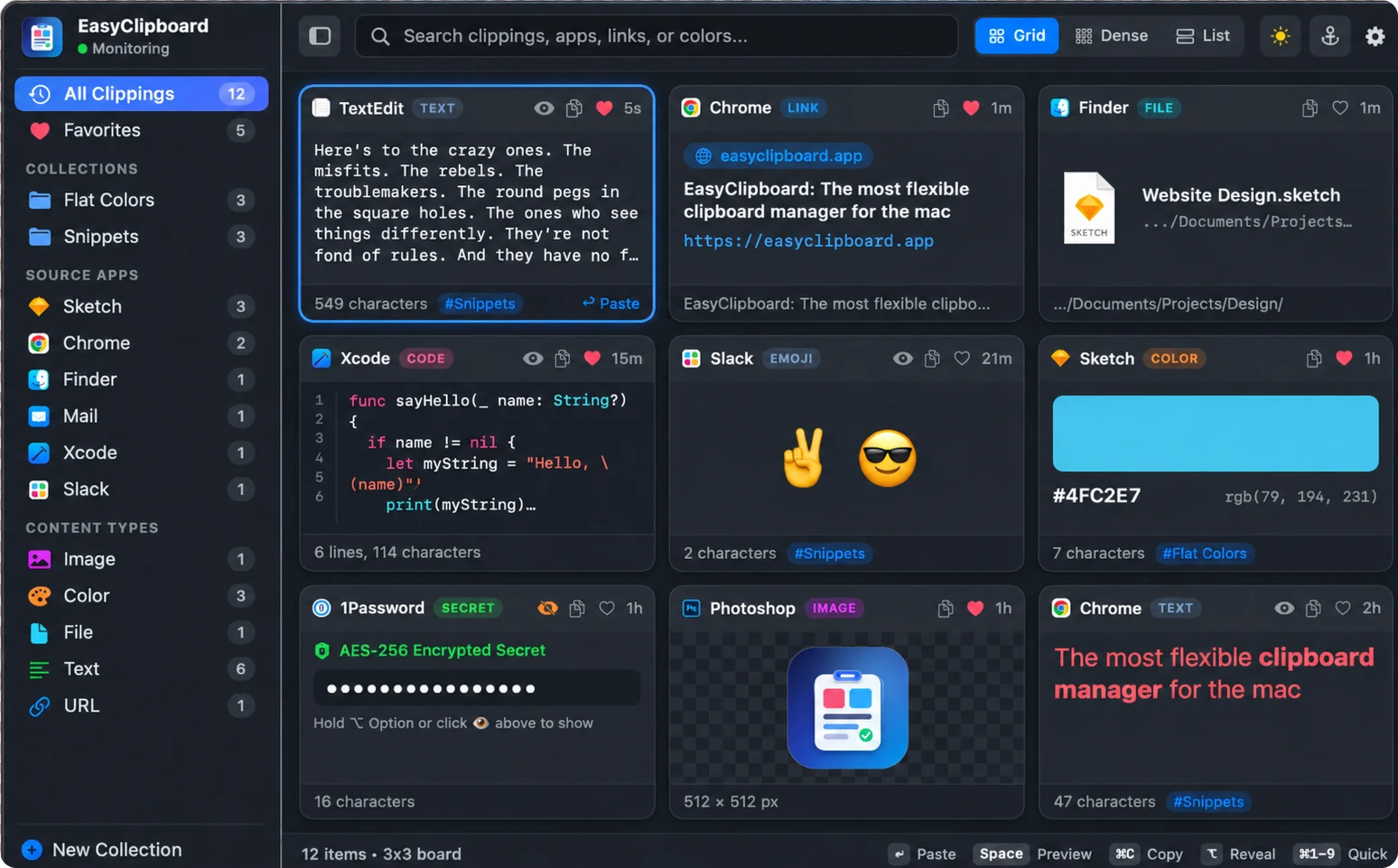
Designed for how you actually work on a Mac
Instead of a cramped plain-text dropdown list, EasyClipboard gives your clipboard history a rich visual workspace with instant keyboard control.
Grid, Dense & List Layouts
Switch effortlessly between 3×3 Grid, 4×4 Dense, and 6×1 List modes from the top command bar, or customize up to 10×6 cards on the fly with ⌘+ and ⌘-.
AES-256 Secrets & Eye Masking
Passwords from 1Password, Keychain, and Bitwarden are automatically encrypted on disk using AES-256-GCM. Plus, click the 👁 Eye icon on any text card to mask sensitive notes or hold ⌥ Option to peek.
Smart Content Recognition
Code snippets get line numbers and syntax coloring. Hex color codes render live color swatches with RGB breakdowns. PNGs display on a transparency checkerboard with pixel dimensions.
Filter by App, Type & Collection
Filter clippings by source app (Xcode, Chrome, Sketch, Finder, Slack), content type, Favorites, or custom Collections. Right-click any sidebar group to clear its items in one click.
Keyboard-First Speed
Summon the board with ⌘⌥V, hold ⌘ to trigger ⌘1..9 instant card selection, press Space for full Quick Look preview, or ⇧⌘V for plain text.
Clutter-Free Menu Bar Utility
Lives quietly in your macOS top menu bar with zero Dock clutter. Left-click to toggle the board open or closed; right-click the menu bar icon for instant access to layout and preferences.